
Showing posts with label glitch. Show all posts
Showing posts with label glitch. Show all posts
Friday, July 1
Si Begg - Electro Glitch Essentials Sample Library
"Si Begg and Zero-G present over 2GB of glitches, noises, bass, loops and logic tools for the discerning dance producer. Out 1st July 2011."
-Si Begg
Multi-Tap Delay Freakazoid v1.0
"Redesigned Interface with a multi-tap feature. Each tap has its own delay time, level and pan settings.
Kept the frequency shifter from the previous version with a randomizer feature that creates rhythmic patterns using the logistic population equation algorithm."
-Rishabh Rajan
Monday, June 27
Richard Devine Elements!

Richard Devine has 4 new sample packs available at Beatport's Sounds/to/Sample website. The packs are part of Sounds/to/Sample's Elements series:
"Elements are cutting-edge, copyright free drum loops and musical phrases created by the world's leading producers. Each pack consists of 10 loop elements presented as 24-bit Wavs assured to inspire and add spice to productions."
Devine's packs feature glitched grooves, drops, and tension builders and cost a meager $1.99 each. I'm skipping the Pad Thai I was going to pick up for lunch and ordering up Elements 1 & 4 instead. Looks like it's peanut butter jelly time at su casa. Order your own Elements @ www.soundstosample.com/elements/DEVSND/

Loops and Sample Element pack Example 4 on BeatPort by RichardDevine
Friday, March 18
Key FluX FX Processor - Reason 101
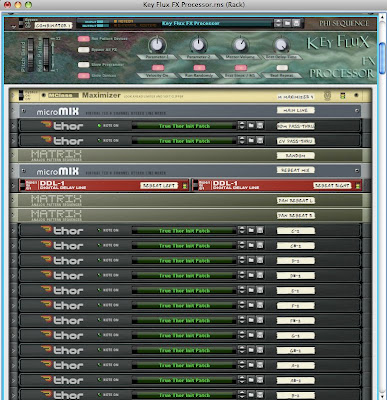
"So one week, 300 + devices, 84 FX chains, enough cables to circle the earth at least once, and a massive caffeine-induced headache, here is my “Key Flux FX Processor.” Ta-da!"
Download the Key FluX FX Processor for FREE @ Reason101.net!
Glitch my Sax Up! 2 - Ableton Live Performance Video
Ableton Live Performance Video from Vespers, Ableton Live Certified Trainer, Vancouver, BC, Canada. www.vespers.ca www.soundcloud.com/vespers www.twitter.com/djvespers www.facebook.com/vesperspage
Glitch hop, controllerism, sax.
-Vespers
Wednesday, March 16
Pearls for Swines - God Save the Glitch
Music & video made by Pearls For Swines
Video shows Audiocubes & Thingamagoop
You can download the track here on Soundcloud
-Pearls For Swines
Friday, January 14
Stutter Edit by Izotope & BT
Live Remixing:
BT Interview:
Stutter Edit is a unique playable effect designed by BT and developed by iZotope.
Create entire tracks from just a short loop, or generate incredible live remixes
just by using your MIDI keyboard and a host like Ableton Live. Stutter Edit is
perfect for both the stage and studio.
To try Stutter Edit free for 10 days, visit www.izotope.com/stutteredit.
BT Interview:
Stutter Edit is a unique playable effect designed by BT and developed by iZotope.
Create entire tracks from just a short loop, or generate incredible live remixes
just by using your MIDI keyboard and a host like Ableton Live. Stutter Edit is
perfect for both the stage and studio.
To try Stutter Edit free for 10 days, visit www.izotope.com/stutteredit.
Saturday, January 8
Friday, July 2
SoundHack plugin very good Plugins!
SoundHack make many of my favorite freeware plug-ins! Including +chebyshev,
+decimate, and +bubbler (a granular delay in which grains are pulled from the
delay line with randomized start time, delay time and pitch shift value).
Do yourself a favor and download Delay Trio and the Freesound Bundle
today at www.soundhack.com!
Check out this demo by atabeylive:
+decimate, and +bubbler (a granular delay in which grains are pulled from the
delay line with randomized start time, delay time and pitch shift value).
Do yourself a favor and download Delay Trio and the Freesound Bundle
today at www.soundhack.com!
Check out this demo by atabeylive:
Tuesday, June 15
Monday, June 14
Tuesday, May 18
Tom Cosm - IAC Drivers - Clitch
In this video I explain an advanced way to create a glitching effect
that compliments whatever you want to glitch.
I have named this effect Clitch.
Please visit www.cosm.co.nz for more info!
Saturday, May 8
Tuesday, February 23
dbGlitch in Reason 4 Parts 3 & 4
3:
4:
Here's something I did before in april 2009. I made a complete text tutorial about how to make IDM Breakcore in Reason. In this series I explain how to re-create DBGlitch inside Reason.
Personally I never backed up the whole thought process by making a video about it. But then again, I also realized someone STOLE my idea, posted the patch on serious-sounds forums saying it was his.
That's why this leads me with no choice to make a video about it.
www.hydlide.nl
Check out the first two HERE.
4:
Here's something I did before in april 2009. I made a complete text tutorial about how to make IDM Breakcore in Reason. In this series I explain how to re-create DBGlitch inside Reason.
Personally I never backed up the whole thought process by making a video about it. But then again, I also realized someone STOLE my idea, posted the patch on serious-sounds forums saying it was his.
That's why this leads me with no choice to make a video about it.
www.hydlide.nl
Check out the first two HERE.
Wednesday, July 22
Rex Files Redux

Last time we spoke a bit about exploring Rex files in Reason and this evening I'd like to delve a little deeper. One thing I didn't realize when I first started to use Reason was that you could play Rex files with an NNXT sampler. This enables you to do a couple of things, most importantly - looping! The easiest way to set this up is to create a Dr REX and search for the file you want to mess around with. Once you've found a good candidate, go ahead and set your L and R markers for length and copy to track your file (using the "to track" button on Dr Rex, see above.)
Now you'll want to create a NNXT and load the rex file (using browse patch button, just left of NNXT's fake LCD). All you need to do to play the rex file with the NNXT sampler is drag the track in the sequencer from the Dr Rex to the NNXT.

Okay, this is where the fun begins. When the NNXT is expanded (triangle on bottom left of sampler) you have access to each step in your beat and can use the myriad of options available on the NNXT sampler to play with your audio.
Trick #1 is grouping sounds to different audio outputs. To do this highlight the clip you want with your mouse and choose the desired output with the output knob at the bottom right of the LCD panel. And by the way, if you aren't sure about which clip, clicking on the name of the sample while pressing "option" will play the file. I generally will drag and drop the files I want together to the bottom and top of the lcd panel, so I can assign the outputs all at once, by pressing "shift" while clicking on them. Why would you want to have separate audio outs? One reason is to have different effects on different samples. How about a delay on the highhats. A Scream distortion on the snares. Another Scream emulating a Tube amp on the kicks. The possiblities are endless.
Trick #2 is my favorite of all... Using the "loop start" and "loop end" knobs to creating clicks, cuts and glitching effects. Now you'll need to highlight the sample you want to play with again and turn the "play mode" knob to "FW-LOOP". Try different settings to get anything from buzzes to flams to stuttering rolls. I've found for drums you generally want to set the end for something under 50% and even lower for glitching sounds. Unfortunately there's no edit automation for the knobs directly under the LCD, so you have to set it up for the track, or use a couple of NNXTs loaded with the same files for different glitching effects on the same sample.

Trick #3 is using the LFO section (bottom left of NNXT remote editor) to create filtering, tremolo, and pitch-shifting effects. As with the last two, you'll want to highlight the sample you want to edit and then try playing around with these settings. There's no hard or fast rules here and the easiest way to find something you like is to tweak the knobs while you have the beat looping. The LFO has 5 different waveforms to choose from, the saw and square being my favorite of the bunch. Keep in mind the rate can be tempo sinked up to 1/32 if you are looking for a fast tremolo or warbling pitch effect. Of course you can choose free run on the LFO's rate as well.
Glitch Machine V3

A new day, a new Glitch Machine! We're up to Version 3 for those of you keeping track. A while ago Koshdukai presented a video on Youtube of his new effects device, "Regrainzer". This combinator used keys to play different effects, in a fashion similar to Sugar Bytes' Artillery 2. In the video he doesn't really show the secret behind his technique and I spent a good week trying to figure it out. (Turns out I was wrong, but that's not really important.) This combinator is the result of my struggle. The Glitch Machine V3 has 3 effects, activated by C1 (distortion), C#1 (flanger), D1 (loop). The Mod Wheel adjusts the effect being played, while the PitchBend does resonance. Button 3 adds a delay on the effect (except for on the looper), and Rotary 4 controls the Frequency. Why does this have a filter? Because I love Low Pass Filters. Anyhow, this is no where near as complex or as impressive as the version that Koshdukai will be releasing in the near future, but I thought some of you would get a kick out of it. Link:
glitch machine v3

Click here to check out a demo rps version of Koshdukai's Regrainzer!
Monday, July 20
CV DELAY COMBI

Here's a glitch/dub combinator I've been working on for a while for Propellerhead's Reason software. I love effects in my music, especially on drums and this one excels at glitchy dub delays without venturing into beat repeater territory (because we've been there before, both here and here.) I recommend this combi for dubstep, reggae, and d&b.
Here's an rps example:
CV Delay Example
And the combi alone:
CV Delay v2
Monday, July 6
Copy Machine

Here's another one from the Props board I'm putting up here for posterity. Text from the board:
Made a new combinator this morning! Originally I was trying to make a Reason version of Squarewave Parade's "Teaspoon":
Square Wave Parade
After I started making it I incorporated some of my favorite elements of Shuriken's Copy Shop:
Shuriken's Copy Shop
Hence the name Copy Machine. Probably nothing new to a lot of you, but I thought I'd share...
It has a basic repeater in the blue section. Some pattern alterations controlled in the red section (courtesy of Malstrom's Mod A section controlling the CV of a DDL-1's feedback.) And finally the grey sections are controls for the filter that only works on the repeating sounds. The Pitch-bend controls the frequency (and a bit of resonance) while the Mod Wheel controls the rate of the filter - because the filter is being controlled by Malstrom's Mod B. Here's an RPS example:
Copy Machine.rps
and the combi:
COPY MACHINE
Subscribe to:
Posts (Atom)