Most of you have probably seen the new iPad Air commercials, but if you've been living in a bunker like me perhaps you missed this great one released a couple weeks ago featuring Finnish composer and conductor of London's Philharmonia Orchestra, Esa-Pekka Salonen:
New for iPad, Reason's legendary synthesizer Thor!
Thor for iPad puts the mighty Thor synthesizer at your fingertips. Reason's legendary flagship synth delivers a thunderous sound, god-like sound sculpting capabilities and an innovative, lighting-fast keyboard designed for iPad. Thor is a synthesis playground, a flexible sonic workhorse, but above all, an expressive musical instrument for the iPad.
Thor highlights:
• Play Reason's Thor Polysonic Synthesizer on the iPad.
• Load any of the 1000+ expertly crafted synth patches, or create your own from scratch.
• Create your sounds using a palette of multiple oscillator and filter types.
• Play Thor using an expressive touch interface keyboard with aftertouch and strumming.
• Collapse the keyboard to a key and scale of your choice, just like in Figure.
• Move your favourite patches from the iPad to your computer and use them with Thor in Reason
Thor sounds like no synthesizer you've ever heard before - and every single one of them. Where other synths use one specific form of synthesis and one single filter, the Thor polysonic synthesizer features six different oscillator types and four unique filters. What does this give you? Simply the most powerful synth ever created; an unstoppable monster of a sound generator that utilizes synthesizer technology from the last 40 years.
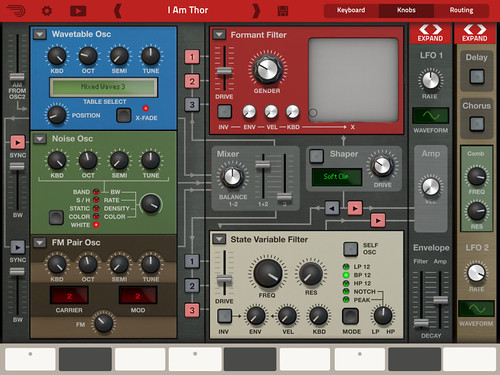
On the iPad, Thor comes with a specially designed interface that's optimized for touch control and the iPad screen. Cleverly designed panels expand and fold at the touch of a button to hide or reveal oscillators, filters, envelopes and more.
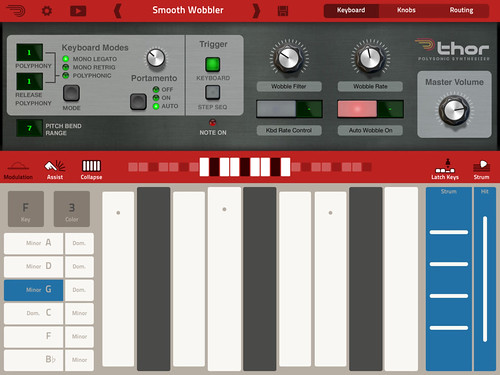
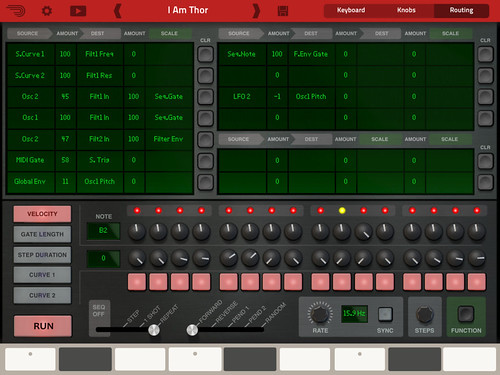
The app is divided into three main screens: Keyboard, Knobs and Routing.
Keyboard mode features:
• Piano keyboard with transpose and range control
• Modulation and pitch bend controls
• Assist function lets you select key and scale to highlight chord notes or to collapse the keyboard to only show the chord notes of the selected scale.
• Strum function lets you play arpeggios by holding a chord while strumming across the strum control.
• Two assignable knobs and buttons acts like performance controls
• Settings for polyphony and portamento
Knobs mode features:
• Access to all of Thor's synthesis features
• Three oscillator slots for Thor's six oscillator types: Analog, Wavetable, FM Pair, PhaseMod, Multi Osc and Noise
• Three filter slots for for Thor's four filter types: Low Pass Ladder, State Variable, Comb and Formant
• Three envelopes
• Dual LFOs
• Delay and Chorus
• The Knobs screen is divided into panels that expand and collapse at the touch of a button
• Miniature keyboard to audition your sounds as you are working on them
Routing features:
• Comprehensive but easy to use routing matrix lets you create complex modulation and signal flow setups
• Step sequencer with 16-steps and six channels: Note, Velocity, Gate length, Step duration, Curve 1, Curve 2
General App features:
• Patch compatible with Thor in Reason on your computer
• Move patches to and from your iPad using iTunes or Dropbox
• Sound bank with more than 1000 Thor patches from leading artists & sound designers (Kill the Noise, Richard Devine, Chris Petti and many more)
• Gorgeous retina display interface
• MIDI in - play Thor from an external MIDI source or from another app on the same iPad
• Audiobus compatible - stream audio from Thor to another audio app on the same iPad
• Audio in background option lets Thor keep playing in the background when working with other apps.
The Lemur app for iPad is on my must buy list! Check out this new video from Liine:
"Contributor Martin Delaney, aka mindlobster, presents a tutorial on novel modulation templates for Lemur: LFO Studio, Kontrolab 2 and CCell. You can use these templates to control any synth module, whether hardware or software."
All three templates are free downloads @ liine.net
Rheyne performing a live improvised jam with only iOS apps and Ableton Live:
"Four of the devices are producing sound, and Lemur is wirelessly controlling effects and live looping in Ableton Live. Nothing was pre-recorded or pre-sequenced for this performance."
Apps used: Physynth by Simian2, AffinityBlue's NodeBeat, Lemur by Liine, and two instances of Moog's Animoog.
- The first MPC designed specifically for iPad 2 - Fitted compartment for iPad 2 provides fully integrated portable MPC solution - 16 backlit genuine MPC pads with MPC Note Repeat & MPC Swing - Works seamlessly with the MPC App: sequence & sample editing, effects, EQ and more - Create beats on the go and transfer to a Mac or PC for further mastering - Double-hinged case sits upright, lies flat or closes for transport - Compatible with virtually any Core MIDI app - Built-in rechargeable lithium-ion battery - Charges iPad when plugged into wall power
MPC FLY iPad App:
- Sequence four tracks simultaneously: four-track mixer built in - Built in sound library of samples and drum kits - Record and overdub sequences and create and edit your own Programs - 16-Levels mode: play one sample at 16 levels of attack, velocity, length, and tuning - Note variation slider allows you to manipulate attack, velocity, length, and tuning as you play - Built-in effects: delay, bit crusher, master compressor/limiter - Time correct: 1/8 note – 1/32T with variable Swing setting - Note Repeat: 1/8 note – 1/32T timing - Sample using internal mic or line-in and trim and categorize samples - Sample from your iPod library with turntable interface - Share on SoundCloud, Facebook or twitter - Supports WIST, Wireless Sync Start protocol from Korg - Supports AudioPaste
"MPC Fly merges unmatched Akai Professional technology with the power of your iPad 2, embodying legendary capabilities that have made the MPC an industry standard like real MPC pads, MPC Note Repeat and MPC Swing. Its multifunctional, double-hinged design gives you the flexibility to produce tracks anywhere, while also acting as a protective case between sessions and giving you total access to your iPad 2 for normal uses. MPC Fly transforms your iPad 2 into a professional beat-making powerhouse." -Akai
- Create the ad-hoc network. - Launch Lemur. - Launch the editor and load the template. - Load the Reaktor Ensemble. - Find out your computer's IP or host-name and add it as an OSC target. - Go to the OSC Settings in Reaktor and type in your Lemur's IP, set the port to 8000. - Activate OSC in Reaktor. - Go to your Lemur and change the OSC Target port to 10000 (Reaktor's default)"
"adapted the stepSeq_4 module from the JazzMutant team to create a multi value step sequencer that triggers a granular combinator patch in Reason 6. This is definitely a way to obtain more musical results from the Lemur - Reason combination, but it lacks transport synchronization.
The granular patch is a derivation of one posted years ago on the propellerhead website." -Peff
Peff putting the new Lemur iOS app thru it's paces with Reason 6:
"Always coveted a Jazzmutant Lemur, but could never justify the cost. So I couldn't pass up the opportunity to work with the iOS app adaptation by liine! This is my first attempt experimenting with the multiball control and physics model to trigger MIDI notes and generate interesting modulation patterns of Malstrom and Echo devices." -Peff
The new Tascam iM2 stereo microphone turns your iPod Touch, iPhone and/or iPad into a "high quality" field recorder! With adjustable microphones, onboard preamp and limiter this looks like the perfect kick around kit for capturing sounds on a daily basis. The iM2 is compatible with the iPhone 4, iPhone 4S, iPod Touch 4G, iPad and iPad 2 models and is made to run with the new PCMRecorder app available for free on iTunes (designed by Chris Randall of Analog Industries blog.) Here's the specs:
- Stereo condenser microphones for iPhone 4, iPod Touch or iPad dock connection - High-quality stereo condenser microphones - same as our best-selling DR-series recorders - Microphones adjustable 180 degrees front to back - Built-in analog to digital converter and microphone preamp for low noise recording - 125dB SPL maximum level for recording loud shows without distortion - Switchable limiter attenuates high-level signals to prevent recording overload - Adjustable input level control - Powered through iPhone, iPad or iPod Touch dock connector - USB input allows the iPhone or iPad to be charged from a USB connection or optional TASCAM PS-P515U - CD-quality digital recording (44.1kHz/16-bit linear PCM) - Compact size ideal for mobile use - Compatible with iPhone 4, iPhone 4S, iPod Touch 4G, iPad, iPad 2 - Dimensions: 2.3" W x 2.2" H x 0.75" D - Weight: 1.05 oz
Chris Randall, under the Naughty Panther moniker, is designing an "analog" style four-channel MIDI sequencer for the iPad called Phaedra. Below is a first look at Phaedra in action clocking NLog Pro's arpeggiator:
update:
"Phaedra's MIDI output all working now." -Cranda11
"In this video Chuck Inglish from the Cool Kids creates a backing track entirely in iMaschine including on site recordings from the skatepark in Venice Beach. Back in the studio he exports the project to Maschine Mikro to produce and arrange it further." -Native Instruments
Animoog, powered by Moog’s new Anisotropic Synth Engine (ASE), is the first professional polyphonic synthesizer designed exclusively for the iPad. ASE allows you to move dynamically through an X/Y space of unique timbres to create a constantly evolving and expressive soundscape.
Animoog captures the vast sonic vocabulary of Moog synthesizers and applies it to the modern touch surface paradigm, enabling you to quickly sculpt incredibly fluid and dynamic sounds that live, breathe, and evolve as you play them.
Visually captivating and sonically immersive, Animoog brings iPad based music production to the next level. Whether you are new to synthesis or a professional, Animoog’s unique user interface gives you the power to easily create a visually vibrant and sonically rich universe. It is the ultimate tool for total creative expression!
Animoog’s diverse library of timbres is derived from analog waveforms captured from classic Moog oscillators, both vintage and modern, and run through a boutique’s worth of high-end outboard and analog signal processors. These include modular synth panels, Moogerfooger pedals and more.
Animoog is the newest innovation in creative tools from Moog Music, the legendary electronic musical instrument company founded by Bob Moog in Asheville, NC.
Key Features:
• Anisotropic Synth Engine (ASE) - An exciting new Moog technology that allows the user to move dynamically through an X/Y space of unique timbres to create an expressive and constantly evolving soundscape.
• Timbre page – Assemble unique sounds in the X/Y space from timbres of a wide variety of vintage and modern Moog synthesizers and pedals. Note: this is NOT simple sample playback.
• Polyphonic Modulation - Simply slide your fingers to control multiple modulation parameters in Animoog right from the keys.
• Polyphonic Pitch Shifting - Easily manipulate the exact pitch of each note in a chord by rotating or sliding your fingers.
• Delay Module - A classic analog style ping pong delay.
• Thick Module - From bit crushing to unison voice detuning and drive, this module adds depth, edge and character to Animoog’s already massive sound palette.
• Moog Filter - The classic four-pole Moog ladder filter with High Pass, Low Pass and Band Pass modes.
• Record Module - Record your performance and overdub new layers, or play along live. Transfer recordings between Animoog and any other apps which support AudioCopy/AudioPaste
• Path Module - Direct ASE through Animoog’s X/Y space to create new expressive and shifting sounds that will blow your mind!
• Orbit Module - Control the rate of orbit in the X/Y space around the path you created for subtle to insane voice manipulation.
• Flexible Modulation Matrix - Amp, Filter and Mod Envelopes, LFO with infinitely variable wave shapes and sync, and four super flexible and assignable modulation slots.
• MIDI in/out - Use your Little Phatty or any other MIDI controller to control Animoog.
Animoog from Moog Music available for .99 cents @ iTunes for the next thirty days! (Regular price will be $29.99)

 Posted with Blogsy


